How Dreamwidth Works – The Profile Page
I’ve seen people saying they can’t find anything on DW, and sometimes, that’s because there’s nothing to find or because it’s all locked down, but I thought I’d take a stab at explaining some site features.
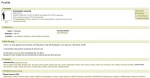
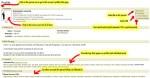
Every DW account automatically has a profile page. You can always find this by adding /info or /profile to the person’s URL. (Similar to people’s ‘about me’ pages on tumblr, but each account automatically and mandatorily has one. The URL is standardized.) You can also click on the little human torso icon next to the account name to go straight to the page. (Clicking on their account name will take you to their actual posts rather than the profile page.)
The image above is my profile page for reference.
On the profile page, you can see “interests”, which are site-wide tags. (I should really go add to mine! I used to have like 500 back on LJ.)
Tags on posts are not site-wide. If you click on them, you get a list of posts from that one account or community.
You can send a private message from the profile. You can also see a list of other accounts the person follows/is followed by. One of the big ways people find friends on DW and on LJ back in the day is to see who their friends follow or to look at the other people in a fandom community.

 Bruises-On-Y0ur-Thighs Backup